

Humanized artificial intelligence with real sources
The best AI for writing academic essays.
Aithor is an artificial intelligence platform created especially for students, designed to improve writing skills and help express ideas with greater clarity and precision. It guides you step by step through your essays and academic papers, in English, Spanish or any of its other languages, and cites real sources you can check. The free plan is a trial: its quotas do not renew.
Sign up with Google or your email and start on the free plan, with its limits.
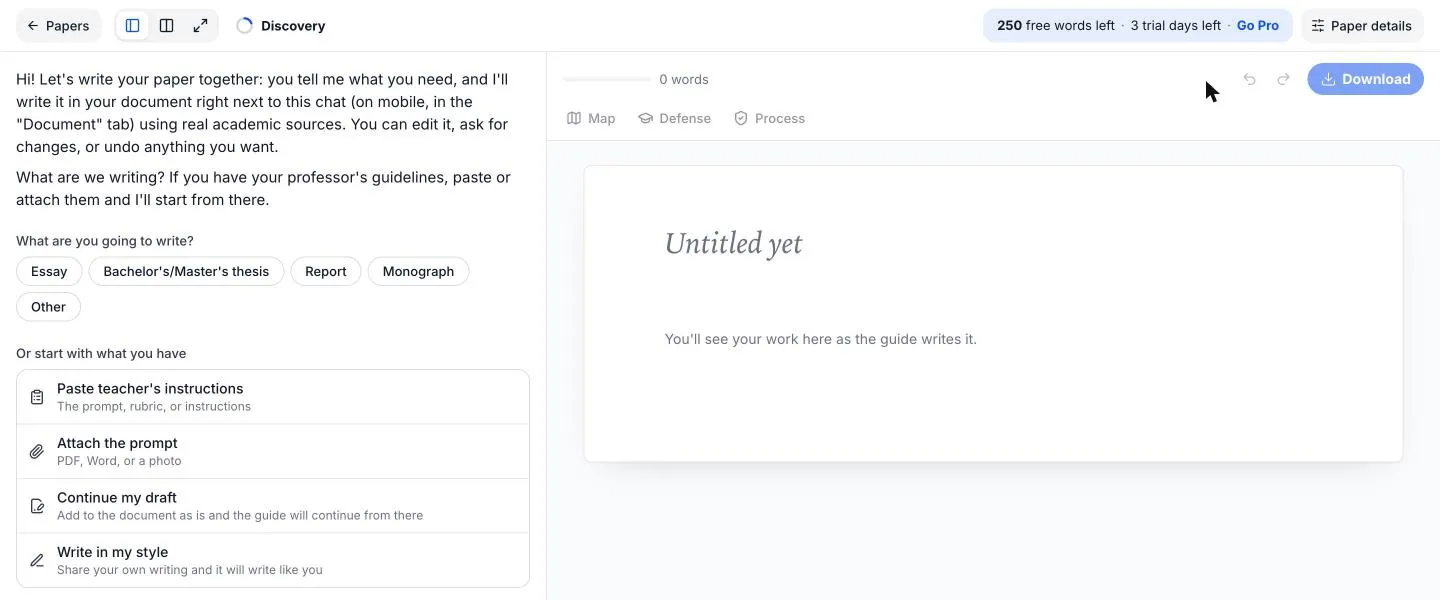
- The guide suggests an outline and you decide which sections stay.
- Every citation comes from a real work you can open and check.
- 10,851 citation styles (APA 7, MLA, Chicago, Harvard, IEEE, Vancouver, AMA, ABNT…)
- Over 200 million scholarly works (OpenAlex)
- Interface in 9 languages: Spanish, English, Portuguese, French, Russian, Turkish, Arabic, Indonesian and Hindi
Facts verified on
Your AI Companion
Aithor is designed specifically for students’ academic writing, with real sources you can check. More than an alternative to ChatGPT, it is a companion that works with you in four steps: the guide suggests and you decide what goes into your paper.
Start from your brief
Paste or attach what your teacher gave you: the brief, the rubric or the syllabus. Reads your brief from PDF, Word, PowerPoint, OpenDocument, text or photos (with OCR), up to 20 MB per file and 20 files per paper.
- The AI does
- Reads the brief and suggests a title.
- You decide
- You keep that title or write your own.
Outline and length
The guide suggests an outline and how long each section should be, in words or in pages.
- The AI does
- Suggests the outline and splits the word count.
- You decide
- You remove, add or reorder sections.
Sections with real sources
It writes section by section in a live document and only cites a work if its abstract supports the sentence. Cites real academic sources from OpenAlex and Crossref.
- The AI does
- Drafts each section and cites in the style you choose.
- You decide
- You edit or undo any paragraph.
Review and hand in
It reviews the paper with you and gets it ready to submit. With Aithor Pro you download Word, PDF or Markdown, with a title page, linked bibliography, footnotes and table of contents.
- The AI does
- Suggests changes to form and content.
- You decide
- You accept or reject each change.
With Aithor you can write academic essays with real sources
A good academic essay argues a thesis in a clear order, backed by studies that support it. With Aithor you can:
Write and Generate Essays
Write your essay with the guide, section by section: an introduction with context and a thesis, a body with your arguments and a conclusion with no new ideas.
Give It Your Own Instructions
Tell the guide the angle, tone or length you want, or ask for changes to any section. You decide the final text.
Cite in the Style You Need
10,851 citation styles (APA 7, MLA, Chicago, Harvard, IEEE, Vancouver, AMA, ABNT…), with the reference list built for you.
Start From Your Own Draft
If you have already started, you do not start from scratch. Imports your draft without rewriting it and carries on from where you left off.
Use Several AI Models in the Chat
In the chat you choose between several models, such as Google’s Gemini and OpenAI’s ChatGPT. With Aithor Pro: no daily limit and full answers.
Create Your Own Custom Tests
Turn your essay or your notes into a quiz to revise before the exam. 4 formats: single answer, multiple choice, true or false and fill in the blank, with an explanation and the source page.
Real sources you can check
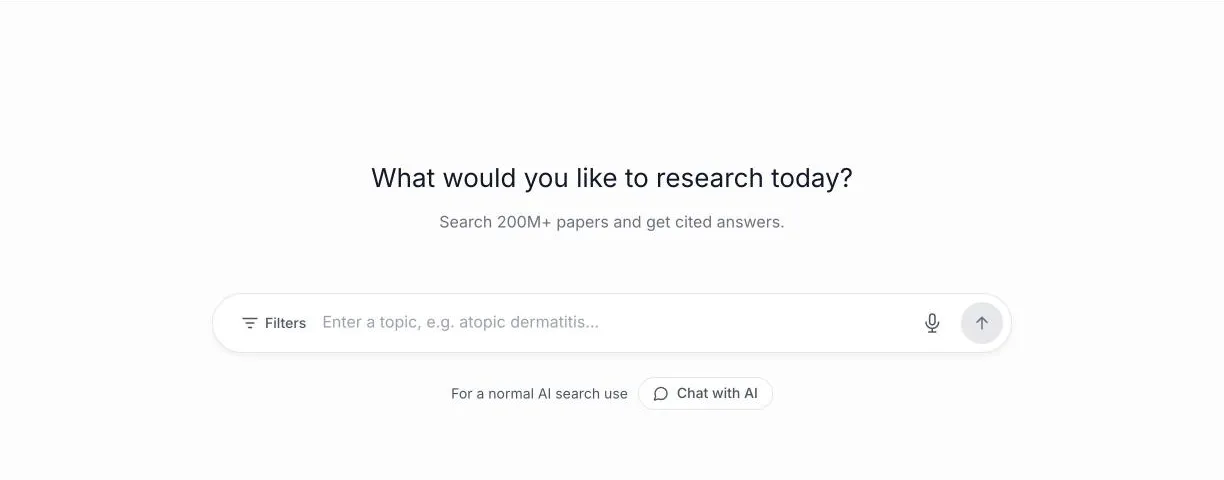
With a general-purpose chat, you have to look up every reference yourself to see whether it exists and says what it is cited for. Aithor starts from real scholarly works and lets you check them.
- Cites real academic sources from OpenAlex and Crossref.
- Over 200 million scholarly works (OpenAlex).
- With Aithor Pro, Check against the source gives the exact sentence and page for each citation, only for articles with an open-access PDF (OpenAlex or Unpaywall).
- In internal testing, citations not supported by their source fell from 22% to 16%: it does not promise zero errors.
Show how you wrote your paper
If your teacher wants to know how you worked, the Process report shows them what happened in the editor, not a promise.
- Shows how much you wrote, who wrote each part (typed, pasted, edited from the guide or from the guide) and how it was done (days, messages and edits).
- Free: the Process report is shown in the editor, no download or link for your teacher.
- With Aithor Pro: Process report in Word and a link for your teacher.
- It measures what happened in the editor: it does not certify that no AI was used.
It measures what happened in the editor: it does not certify that no AI was used.
Study from your own notes
Study from a PDF, Word file, audio, up to 10 photos of your notes, a web page, a YouTube video, your own text or just a topic. Choose what you want out of it:
Quiz
Questions with an explanation and the source page.
Open questions
Questions you answer in your own words.
Flashcards
Question on the front, answer on the back.
Concept map
The key concepts of a topic and how they connect.
Infographic
The essentials of a topic on a single page.
Presentation
Editable slides with speaker notes.
Podcast
Two hosts talk you through the topic.
Video
A video that explains the topic.
Aithor.io compared with a generic AI chat
A general-purpose chat is useful for many things. For an academic paper, these are the differences:
| Criterion | Aithor.io | A generic AI chat |
|---|---|---|
| How it writes | Guides you step by step: the guide suggests, you decide | Answers whatever you ask, with no process |
| Sources | Real scholarly works from OpenAlex and Crossref | Every reference needs checking |
| Citation style | The one you choose, with the reference list done | You do the formatting |
| Checking a citation | Exact sentence and page of the open-access PDF (Aithor Pro) | Only if you upload the document yourself |
| Showing your process | Process report for your teacher | No |
| Studying | Quizzes, Flashcards, Concept maps and more, from your notes | Partly |
Academic integrity: where we stand
Aithor.io is built to help you learn and hand in work that is yours, not to hide that you used AI.
- The guide suggests and you decide: every paragraph can be edited or undone.
- It cites works that exist and lets you check each citation against its source.
- The Process report shows how you wrote your paper, but it does not certify that no AI was used.
- Check your university’s and your teacher’s rules on AI and, if asked, say how you used it.
Frequently Asked Questions
What is Aithor.io and how can it help students?
Aithor.io is an artificial intelligence platform designed to boost student productivity by facilitating essay writing, exam preparation, and research organization. It helps students streamline their study processes and improve the quality of their academic work.
What specific tools does Aithor.io offer for students?
Aithor.io offers tools to assist with essay writing (Guided writing and Write in one go), exam simulations (Quiz, Open questions and Flashcards, in Study), and tools for organizing and managing research information (Literature review and Find sources). These tools are designed to make the learning and academic preparation process more efficient.
Is Aithor suitable for all educational levels?
Aithor.io is designed for adult university students, from undergraduate to postgraduate level. It provides resources tailored to each kind of paper, from an essay to a dissertation or a literature review, in the citation style you are asked for.
How does Aithor.io ensure academic integrity?
Aithor.io promotes academic integrity by providing tools that help students learn and understand the material, rather than simply providing answers. Additionally, citations come with their real sources so you can check them, and the Process report lets you show your teacher how you wrote your work. It measures what happened in the editor: it does not certify that no AI was used.
What AI system does Aithor.io use?
Aithor.io uses several artificial intelligence models, such as Google's Gemini and OpenAI's ChatGPT, and in the chat you can choose which one to work with. For citations, it searches for real academic sources in OpenAlex and Crossref. This allows Aithor.io to provide effective and efficient tools for essay writing, exam preparation, research organization, and other academic functionalities.
What are the technical requirements to use Aithor.io?
Users will need a stable internet connection and a web browser. Works in the browser on a computer or phone, at dashboard.aithor.io: nothing to install.
How can I sign up for Aithor.io?
Students interested in using Aithor can sign up through the website, dashboard.aithor.io. Sign up with Google or with email and password.
Does Aithor.io offer free trials, or is a subscription required from the start?
Aithor allows users to access the platform for free, with a quota for each tool. The free plan is a trial: its quotas do not renew. Once they run out, you can subscribe to Aithor Pro. One paid plan, Aithor Pro, with no lock-in: cancel anytime. The price depends on your country and is shown in your currency.
Is Aithor.io the same platform as Aithor.com, Aithor.co, and Aithor.tech?
No, Aithor.io is not the same platform as Aithor.com, Aithor.co, or Aithor.tech. Each of these domains represents different platforms, managed by separate entities, and they offer distinct approaches and services within the field of technology and artificial intelligence.
What kind of support does Aithor.io offer its users?
Aithor offers support to its users primarily via email. You can contact the Aithor.io team by sending a message to hello@aithor.io. The team strives to respond quickly to all inquiries to ensure that users receive the necessary assistance without delays, providing timely and effective support for any questions or issues that may arise while using the platform.
Ready to boost your skills?
Start your next essay with Guided writing and check every source before you hand it in. The free plan has its limits.
Get started for free